Missed It!4.2
Publisher Description
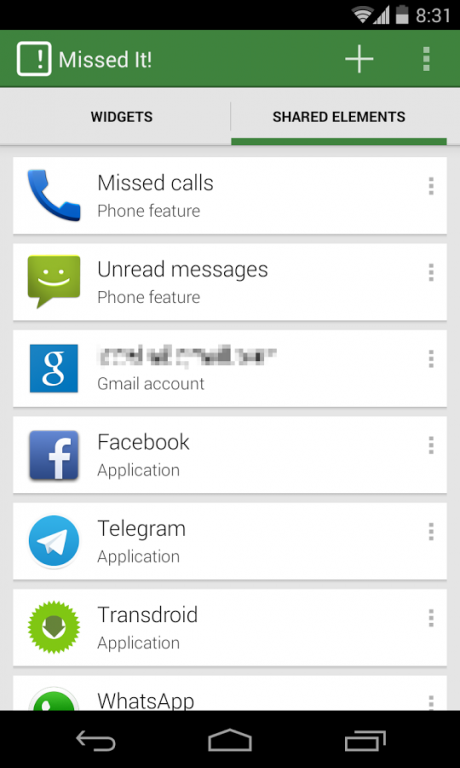
Get information about the number of missed calls, unread SMS, unread e-mail messages and notifications from virtually any application a glance with this simple yet very customizable widget.
On Jelly Bean 4.2, Missed It! widgets can be placed on the system lockscreen. For previous versions of Android, you will need any lockscreen replacement application.
---- SAMSUNG USERS, READ BELOW BEFORE BUYING THIS APP ----
Features:
* Reports number of missed calls, unread SMS and pending voicemails.
* If you use Gmail, K-9 Mail or AquaMail, you can obtain the number of unread messages of each account individually. In the case of Gmail, you can also select which label to monitor.
* Also reports notifications from any application that uses the notification bar to report events (including WhatsApp, Twitter, e-mail clients, etc).
* Share pending notifications with other apps through the “Shared Elements” list. For example, you can use Missed It! as a provider for the Unread Counts feature on both WidgetLocker and Nova Launcher Prime apps.
* Customization of font and background color and transparency. Also font faces (can use fonts stored in external SD card) and styles (bold, italic, underline).
* Customization of the layout (alignments, padding, etc).
* Text messages can be customized to show whatever phrase you want.
* Represent numbers as text.
---- SAMSUNG USERS, PLEASE KEEP THIS INTO CONSIDERATION BEFORE BUYING THIS APP ----
Enabling Missed It! or any other third-party application in Accessibility Services in some Samsung models (Galaxy S3, S4, Note) with TouchWiz launcher will cause some undesired effects. The easiest way to avoid them is to use another launcher (there are very good ones at Google Play for free). Or you can try the following fix: Before enabling Missed It!,disable both Google and Samsung Text-to-Speech to avoid your phone start providing voice notifications of all user actions: Go to System Settings -> Manage Applications -> All, search for both Samsung TTS and Google Text-To-Speech and tap on 'Disable' button.
More info: http://goo.gl/xJzWl
-- PERMISSIONS USED --
READ_PHONE_STATE, to get the voicemail state.
CALL_PHONE, to directly call to voicemail if there is any pending message.
WAKE_LOCK, to wake up the device on upcoming notifications.
NETWORK, for reports about application usage and crashes.
BETA VERSIONS
Are you interested in testing new features added to Missed It! before they are released to the general public? Join the Missed It! Beta Testers Community on Google+, and opt-in to receive Beta versions directly through Google Play:
http://goo.gl/lRpCIf
Warning: Beta versions are only for testing purpouses, as they surely contain lot of bugs. Use them to give feedback on new features and bug fixes.
Problems? Questions?
PLEASE ASK FIRST IN THE FORUMS!!!
http://igecelabs.net/forums
Suggestions? You can make them through http://missedit.uservoice.com
About Missed It!
The company that develops Missed It! is igece.labs. The latest version released by its developer is 4.2. This app was rated by 1 users of our site and has an average rating of 4.0.
To install Missed It! on your Android device, just click the green Continue To App button above to start the installation process. The app is listed on our website since 2014-02-27 and was downloaded 41 times. We have already checked if the download link is safe, however for your own protection we recommend that you scan the downloaded app with your antivirus. Your antivirus may detect the Missed It! as malware as malware if the download link to net.igecelabs.android.MissedIt is broken.
How to install Missed It! on your Android device:
- Click on the Continue To App button on our website. This will redirect you to Google Play.
- Once the Missed It! is shown in the Google Play listing of your Android device, you can start its download and installation. Tap on the Install button located below the search bar and to the right of the app icon.
- A pop-up window with the permissions required by Missed It! will be shown. Click on Accept to continue the process.
- Missed It! will be downloaded onto your device, displaying a progress. Once the download completes, the installation will start and you'll get a notification after the installation is finished.
Program Details
System requirements
Download information
Pricing
Version History
version 4.2
posted on 2014-02-27
** IF YOU'VE PROBLEMS AFTER UPDATE, REBOOT YOUR DEVICE! **,Cards-based user interface.,Direct support for AquaMail email client.,Different counter reset modes (only for Android 4.3 and later).,Application elements can show additional information.,Notification filters (only for Application elements).,Shared Elements include fully customizable output strings that other apps can use.,Backup for application settings and Shared Elements.,Send anonymous reports about application usage and crashes.
version 4.0.5
posted on 2013-06-14
Several fixes and updates
